Tool
Neural Architecture Diagram Editor
An interactive diagram editor for composing clean neural-network architecture visuals while learning, designing, and documenting models. Built to make architecture reasoning inspectable and reusable instead of redrawn by hand.
Overview
Neural Architecture Diagram Editor is a custom diagramming tool for building neural network architecture visuals as structured, reusable artifacts rather than one-off drawings. I built it because I wanted a better way to think through model structure while learning, not just a cleaner way to present it afterward.
This tool edits diagrams of architectures, not model code or training graphs. The value is that it makes architecture reasoning easier to inspect. Instead of keeping the model in my head as a rough sketch, I can externalize the structure, refine it, and reuse the same artifact later in project notes, technical writeups, and comparison discussions.
A live build is available here: https://mister-jp.github.io/neural-architecture-diagram-editor/
Why this tool exists
Neural network diagrams are easy to treat as decoration. In practice, though, they can expose whether the architecture is actually understood clearly.
That became obvious to me while working through early model design decisions. It is easy to describe a model loosely in words, but much harder to represent it cleanly enough that the relationships, stages, and sources of complexity are all visible at once. When that clarity is missing, design decisions become harder to question and unnecessary complexity can slip in without enough scrutiny.
This tool exists to reduce that ambiguity. I wanted a tool that helps build the diagram as part of the reasoning process itself, not only as a final presentation step once decisions are already locked in.
The gap I was trying to close
Existing tooling tends to help with only part of the workflow.
Some tools are good at generating polished static diagrams. Others are useful for inspecting model graphs. Some explain isolated concepts well. What I wanted, though, was something narrower and more practical for my workflow: a way to author and revise an architecture visually while I was still trying to understand it, then keep that same artifact as a reusable explanation surface.
The gap was not simply visual quality. The gap was in the workflow.
I wanted something that supported the full loop: think through the structure, make relationships explicit, revise the diagram as the architecture evolved, and reuse the result in technical communication without redrawing it from scratch.
What I am building
The tool is a diagram editor built around a small set of reusable architecture primitives and a structured representation of the scene. The goal is to make architecture diagrams editable and repeatable rather than disposable.
In practical terms, that means the tool supports authoring, adjustment, annotation, and export in a way that stays useful across multiple stages of work. A diagram can begin as a thinking aid, become a review artifact, and later serve as part of project documentation without needing to be recreated each time the model changes.
The important idea is that the diagram is not treated as the final output of thought. It is treated as one of the tools used to make the thought itself clearer.
Real use case
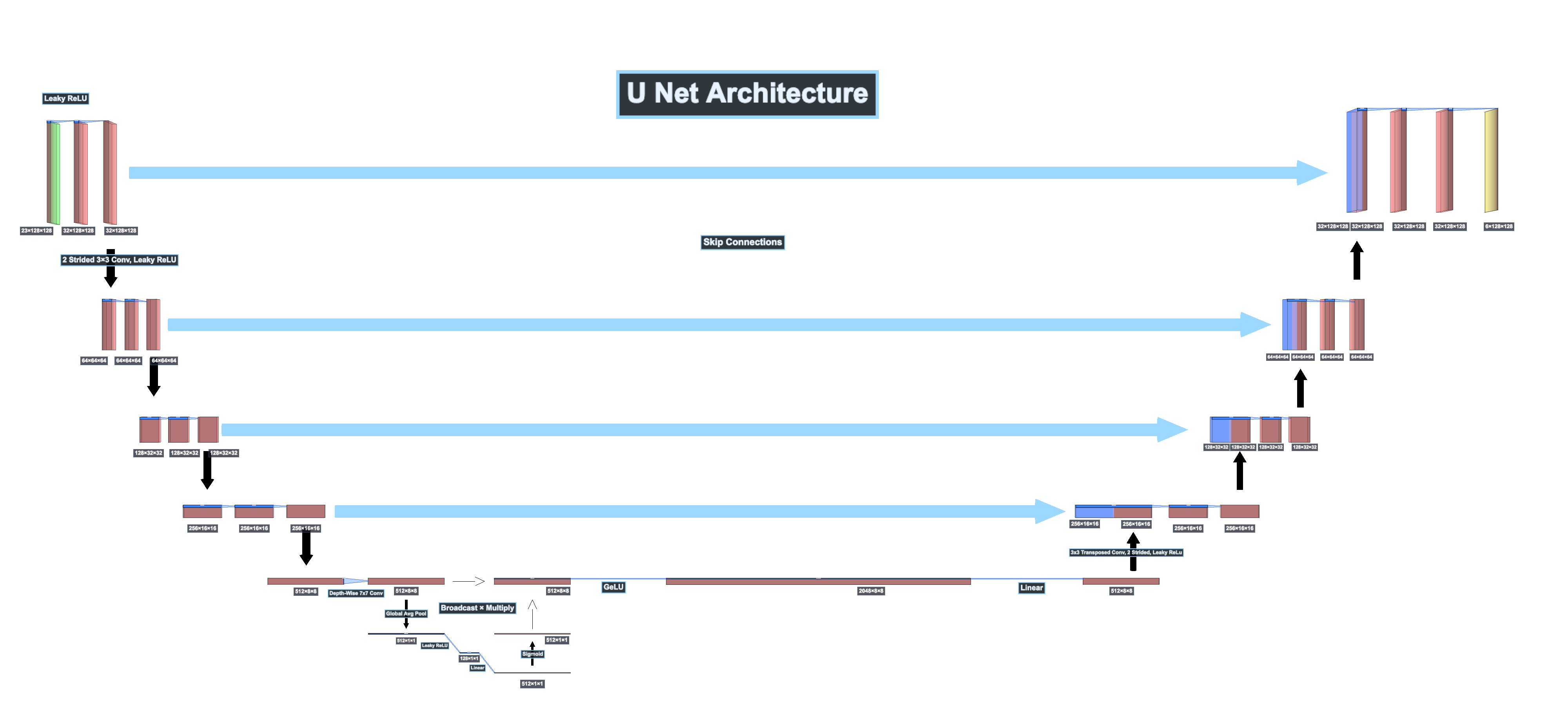
This tool became most useful while I was working through the first U-Net-style baseline for my BSCCM image-to-image project.
As I started sketching the baseline, I realized that drawing the architecture forced me to answer questions that were easy to leave vague in plain text. Once the structure had to be represented visually, I had to become more precise about stage progression, skip pathways, bottleneck behavior, decoder reconstruction, and where added complexity was actually justified.
That changed the role of the diagram. It stopped being a presentation layer and became part of the learning process.
What the U-Net exercise clarified
The most valuable outcome of using the tool was not that it produced a clean final image. The more important outcome was that it forced clearer architectural judgment.
While working through the U-Net baseline, the act of building the diagram made it easier to separate ideas that are often spoken about too loosely. Skip connections and residual connections, for example, serve different roles. Once they had to be represented clearly, the distinction became harder to blur.
The bottleneck was another place where the visual representation helped. It became easier to see where I was adding structure because it served a real purpose and where I was at risk of adding complexity simply because it sounded more advanced. That mattered while thinking through a richer bottleneck design and deciding how much of that belonged in an early baseline.
The same was true for decisions I chose not to keep. I considered adding U-Net++ style skip-path refinement, but kept it out of the baseline. While the approach has shown gains in segmentation settings, the added complexity was too significant for the role I wanted this first baseline to serve: a simple, interpretable reference point for clean comparison. Representing the architecture visually made that tradeoff easier to inspect rather than leaving it as an abstract idea.
This is the kind of judgment I wanted the tool to support: not just drawing what is there, but making it easier to see what should not be there.
Outcomes
The clearest outcome of this project is that it gave me a more reliable way to reason about architecture structure before implementation details became too noisy.
It improved my own understanding of the models I was building, made architecture choices easier to review, and produced reusable visuals that could carry across project pages and notes. It also reduced the amount of re-drawing and one-off cleanup that usually comes from treating diagrams as disposable presentation assets.
Just as importantly, it created a public starting point that can be extended further. The project is not valuable only as a private utility. It is also a foundation that could be expanded with additional primitives, stronger layout controls, and more expressive ways to represent modern model components.
Limits and next steps
This is still an intentionally scoped tool.
Right now, it is strongest when used for CNN-style structural diagrams, especially cases where the architecture benefits from staged, multi-scale visual reasoning. It is not yet a complete semantic editor for every modern block type, and there is still a practical balance to manage between detail and readability, especially when diagrams need to work well on the web.
The next stage is not about adding features for the sake of feature count. The next stage is about making the tool more useful in the same direction it already serves well: better layout control, cleaner exports, stronger readability, and more modular support for common architecture patterns.